Analytics for school bookkeepers. No SQL. No analysts. No waiting.
"Our mission is to bring analytics to everyone, everywhere."
GoodData, as a B2B company, provides (among others) embedded analytics. Customer integrates analytics into their product in a way, that end user doesn't even know GoodData exists. To create insights, you'll use Analyse, a drag-and-drop tool, that won't let you do what doesn't make (analytical) sense.
"Our mission is to lead digital transformation of schools, ..."
BlackBaud embedded analytics from GoodData in order to provide all the relevant information in one place to serve school management, inform teachers, and guide parents and kids. But there is a problem - no one from management is able to create new numbers because they can't access the functionality.
Ensures timely payments, oversees funds, allocates budgets. Understands finances and business. Has no experience with SQL, metrics or how data is connected.
Ellen can't create new numbers. Now, to get a new number, she submits a ticket to BlackBaud and waits.
Appointed as the UX designer responsible for all features developed in collaboration with BlackBaud. Full ownership from discovery to delivery.
From the start, the design proposed four basic operations, drag-and-drop, no function names to recall, no field IDs to type. The alternative was a text field supporting every function from SUM to MEDIAN to rolling calculations. 100% coverage; inaccessible to Ellen from day one. In a product trio, no one makes the call alone. What design brought was the lens: simple and discoverable over complete and complex.
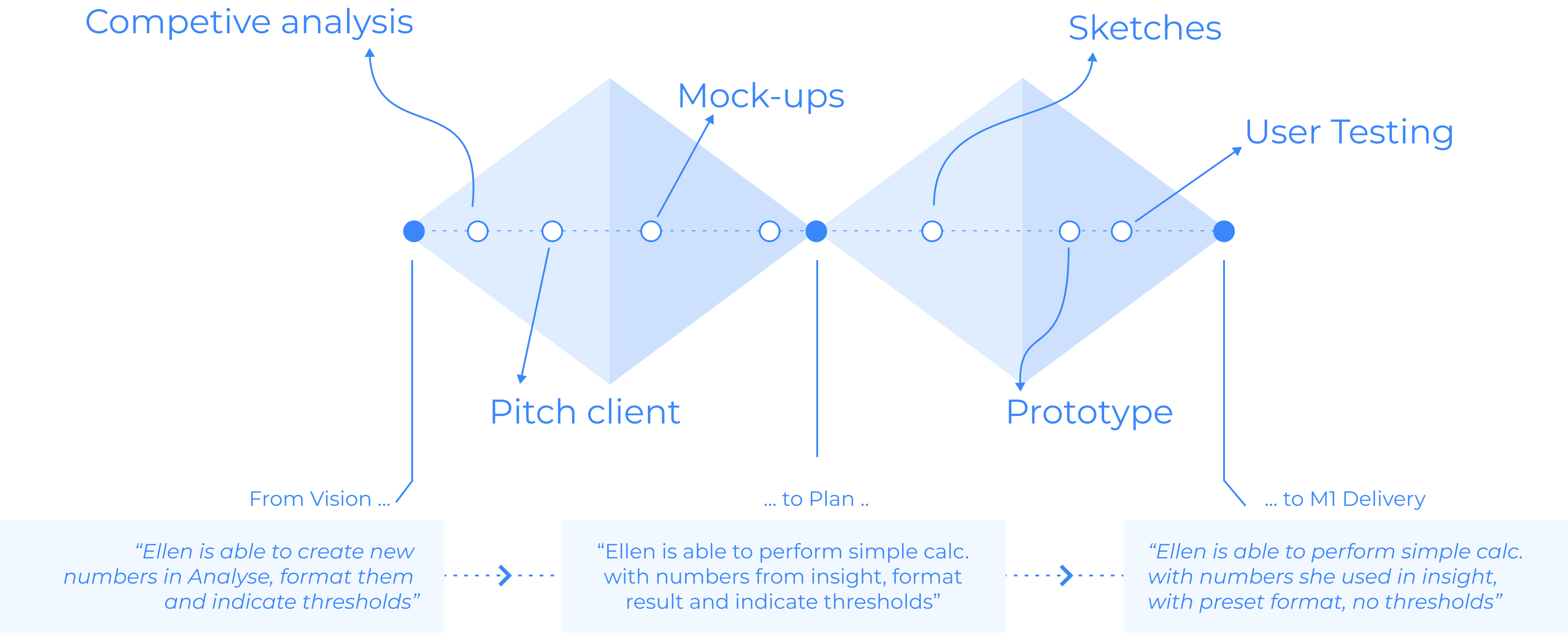
Discovery covered three angles: analysing current options available to users, interviewing the customer team (PMs, technical architect, designer), and running competitive analysis.
The most influential input came from data analysis done by the PO. Analysis of thousands of measures already in the system showed that over 70% are "simple" - addition, subtraction, multiplication, division, and change over time. That single data point confirmed the scope decision.
Simple number operands (+, -, /, *, ↑↑) will decrease BlackBaud support tickets and increase usage of Analyse for insight creators like Ellen - because they cover the majority of calculations needed.
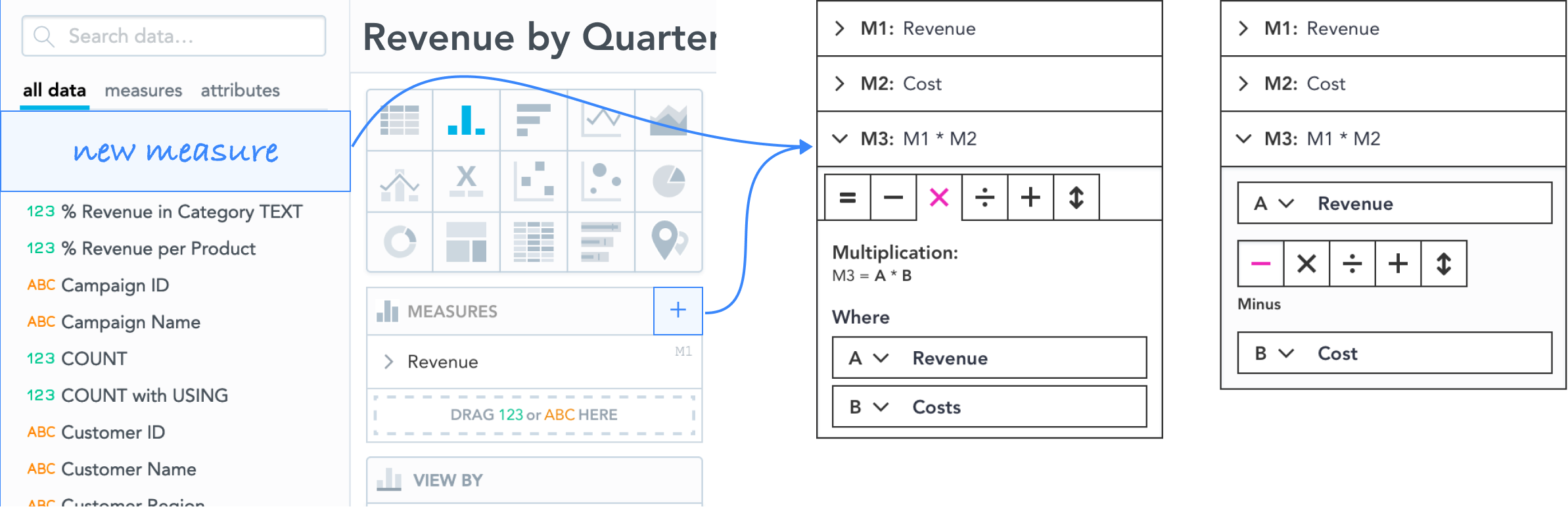
Two directions explored. First: each operation (+-/×) as a separate tab, with its own A and B operands - familiar structure, but tab-switching broke down for operations like Growth where direction matters mid-calculation. Second: a single text input for any expression - full coverage, wrong audience. Ellen doesn't write formulas.
Both concepts worked from the full catalogue via drag-and-drop - all data available, user picks what to calculate with. The scope decision came later, during milestone planning, when engineering proposed starting only with metrics already in the visualization. That single constraint changed A and B from drag-and-drop areas to dropdowns - a smaller interaction surface, but a better mental model for what Ellen was actually working with.
Mock-ups reviewed internally with stakeholders and externally with BlackBaud. Translated into a clickable prototype with a written script for usability testing. Testing conducted with the BlackBaud UX team.
A validated, full-featured solution - ready to ship. The scope was clear, the design was solid, the findings were addressed. Everything it takes to go from zero to a year of engineering work.
UX copy is an integral part of the design process - it directly influences how clearly a solution communicates. How should Ellen choose what she wants to calculate? How should Growth and Loss be named, when there is only one operation but two directions?
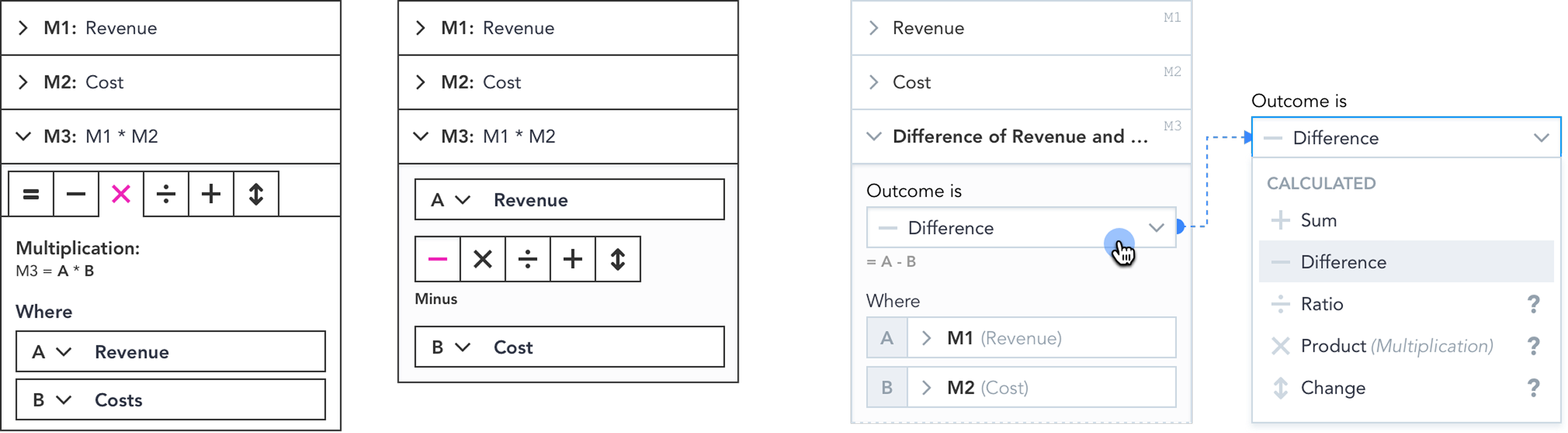
Each mathematical operation was mapped to three things: the result name (what the user gets), the operator name (the word used in the interface), and the formula notation.
| … operation | … result | … operator | … calculation |
|---|---|---|---|
| Change (Growth / Loss) | (A - B) ÷ B | ||
| Division | Ratio or Quotient? | Divided by | A / B |
| Addition | Sum | Plus | A + B |
| Subtraction | Difference | Minus | A - B |
| Multiplication | Product | Times | A * B |
How do we divide the design to bring the solution to users as soon as possible - shortening time to market, delivering on user needs, and preserving engineering sanity along the way?
By listening to constraints from developers who understood how the system works, discussing business needs, and naming priorities with the PO. Business, design, and engineering together - cut through the design, identified milestones, and built the best solution for all parties.
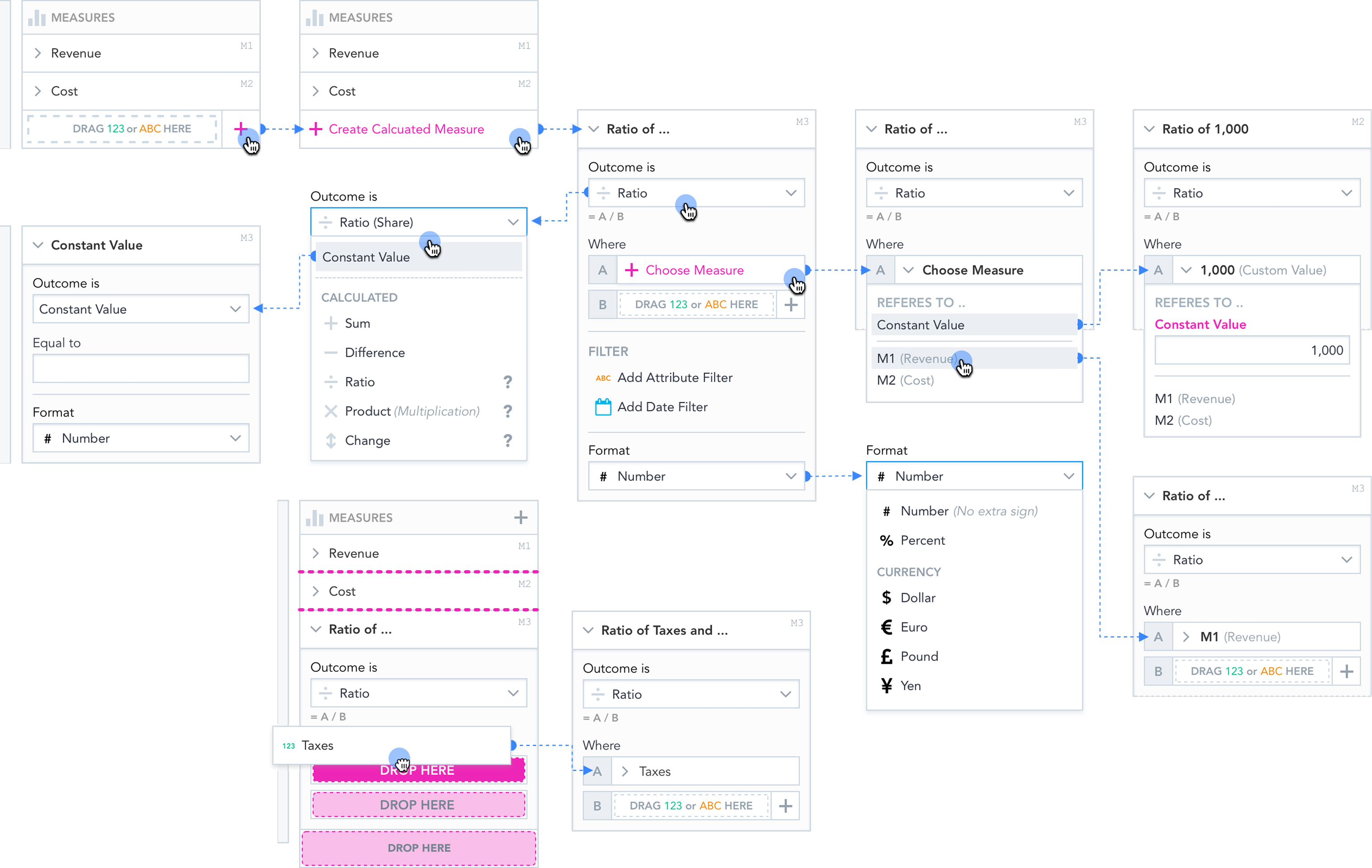
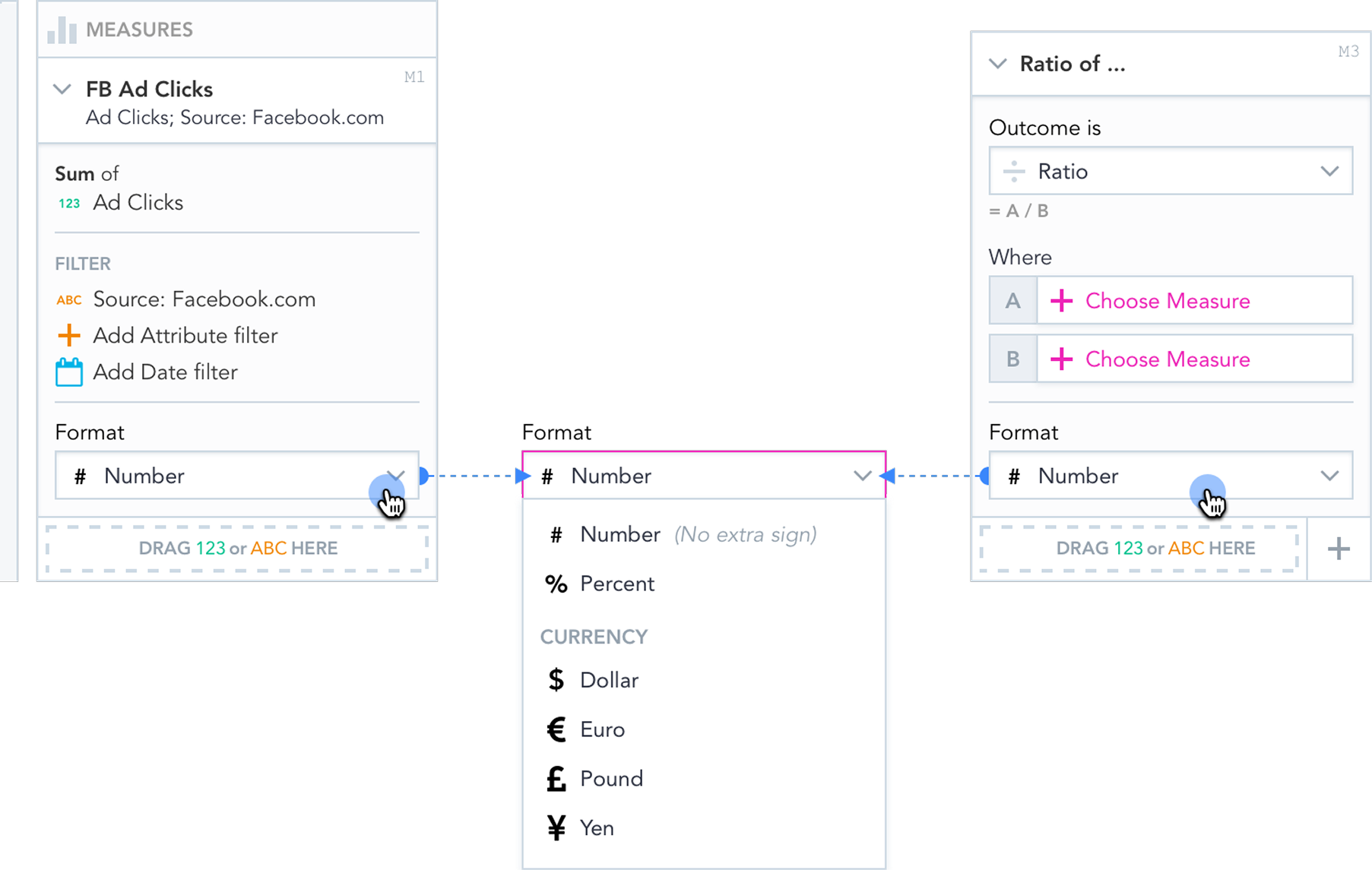
Metrics from the current visualization only - not the full catalogue. Engineering's constraint became the better mental model: Ellen works with what she can see. A and B as dropdowns. Four operations. Format auto-assigned by type.
Constants required entirely different mechanics from a metric. Engineering solved it as a standalone problem - added once ready.
Financial formats only - EUR, $, £, ¥, % - pulled from usage data. Pareto applied to formatting the same way it was applied to operations. Full formatting suite as a later tier.
The final design names each operation by its outcome - what the user gets - with the formula as a secondary reference. Outcome first, mechanics second.
Ellen no longer submits a ticket and waits. She gets the answer herself - live, in the product, connected to real data. The workaround - export, calculate elsewhere, bring back a number already out of date - is gone. Data integrity is no longer someone's manual responsibility.
Simple measures covered what Ellen actually needed. Advanced calculations - powerful but requiring analytical judgment to use correctly - were kept separate, in the admin layer, for users equipped to work with them. The right tool for the right user.
Shipped. BlackBaud confirmed the feature addressed the primary blocker for their non-analytical users. The ticket queue for custom metric requests - the one Ellen had been contributing to - no longer exists for this type of request. Ellen can calculate.